Live demo · axis-demo.mikodes.com

Launch a perps terminal. With a builder fee you set.

Orders placed from your build carry your builder code. Once a trader's wallet approves the rate, Hyperliquid pays the builder fee to the address you set. It is off until you turn it on. Keys never leave the user's device.

The terminal in demo mode: sample market data and a sample address with no key, so nothing is signed or sent. No wallet to create.

  • Hyperliquid perps terminal
  • Flutter source code
  • 19 docs pages
axis-demo.mikodes.com
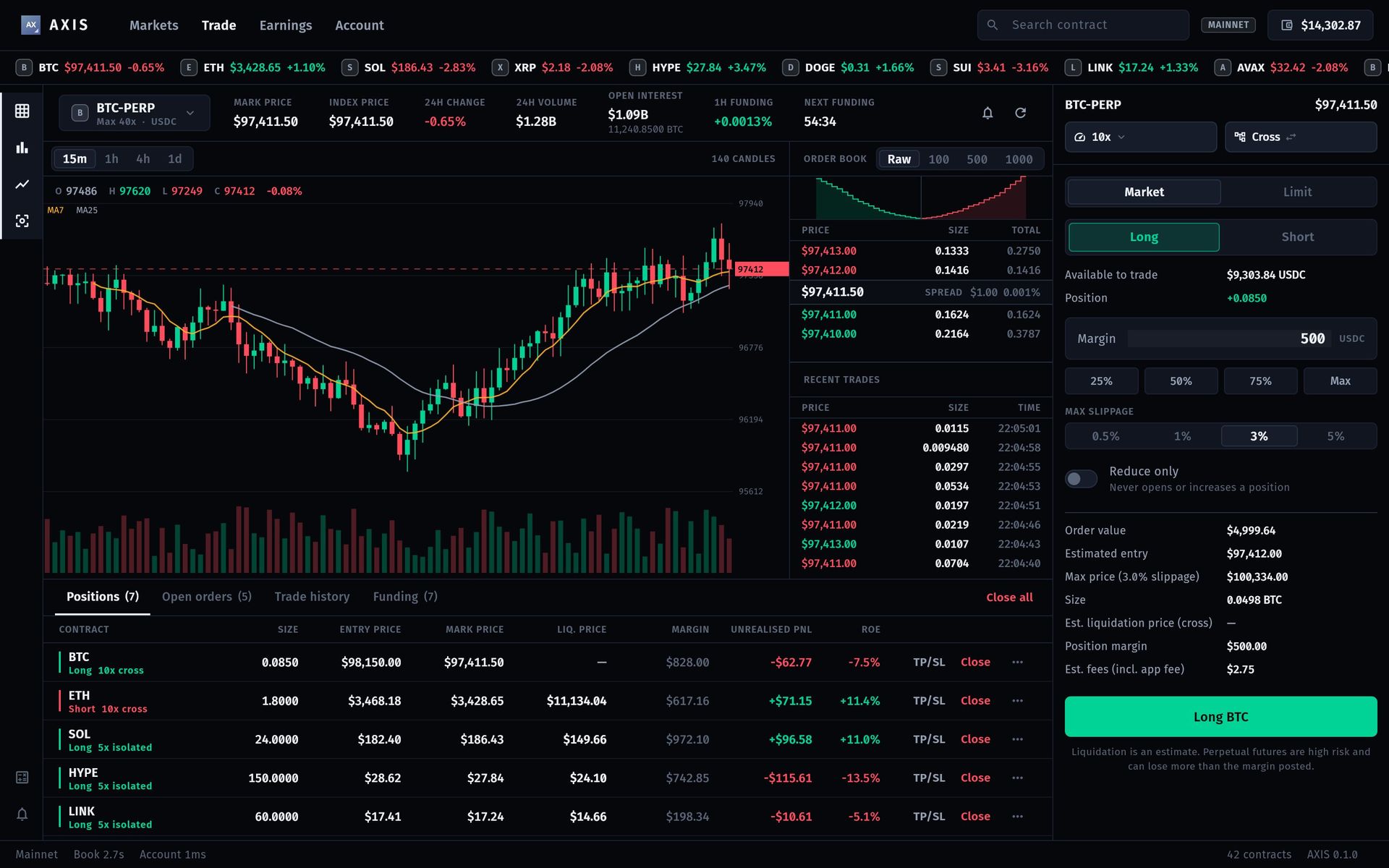
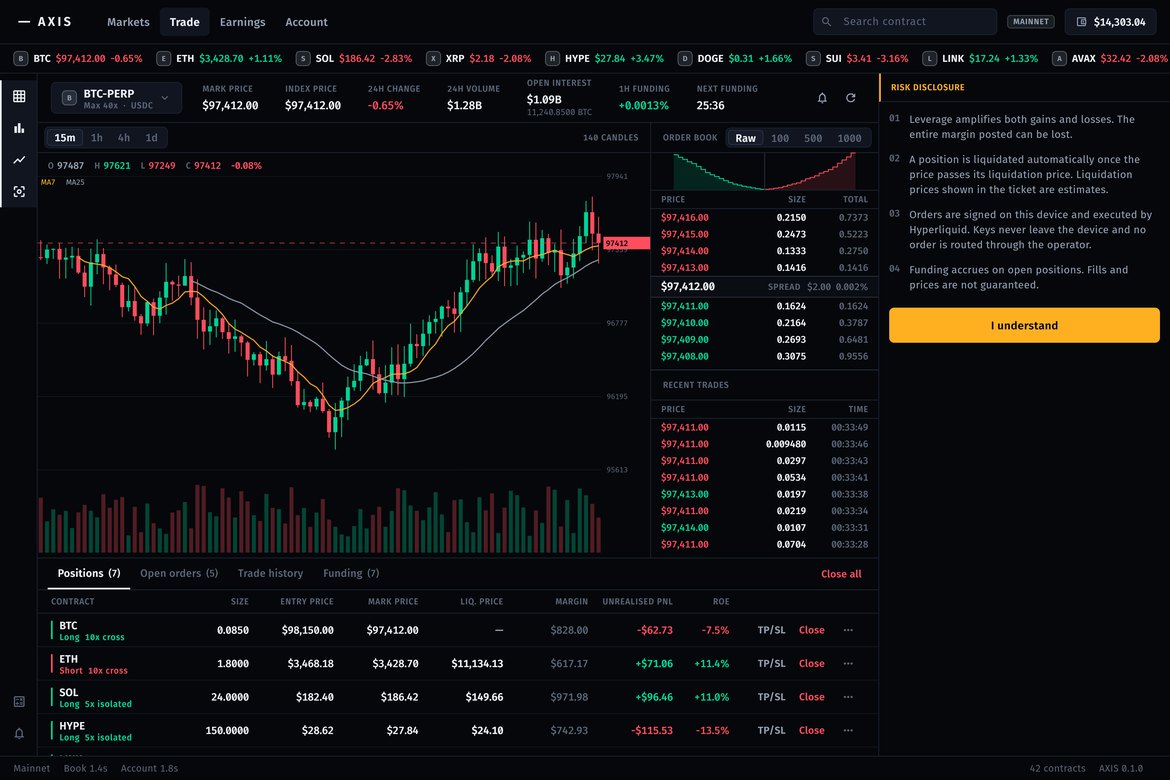
AXIS desktop trade screen: BTC-PERP chart, order book, recent trades, positions blotter and a Long BTC ticket with 500 USDC margin
Revenue calculatorWhat could it earn you?Your users, volume and fee — the caps come from the code.Revenue calculator →
protocol cap per perps fill0.1%
9:41
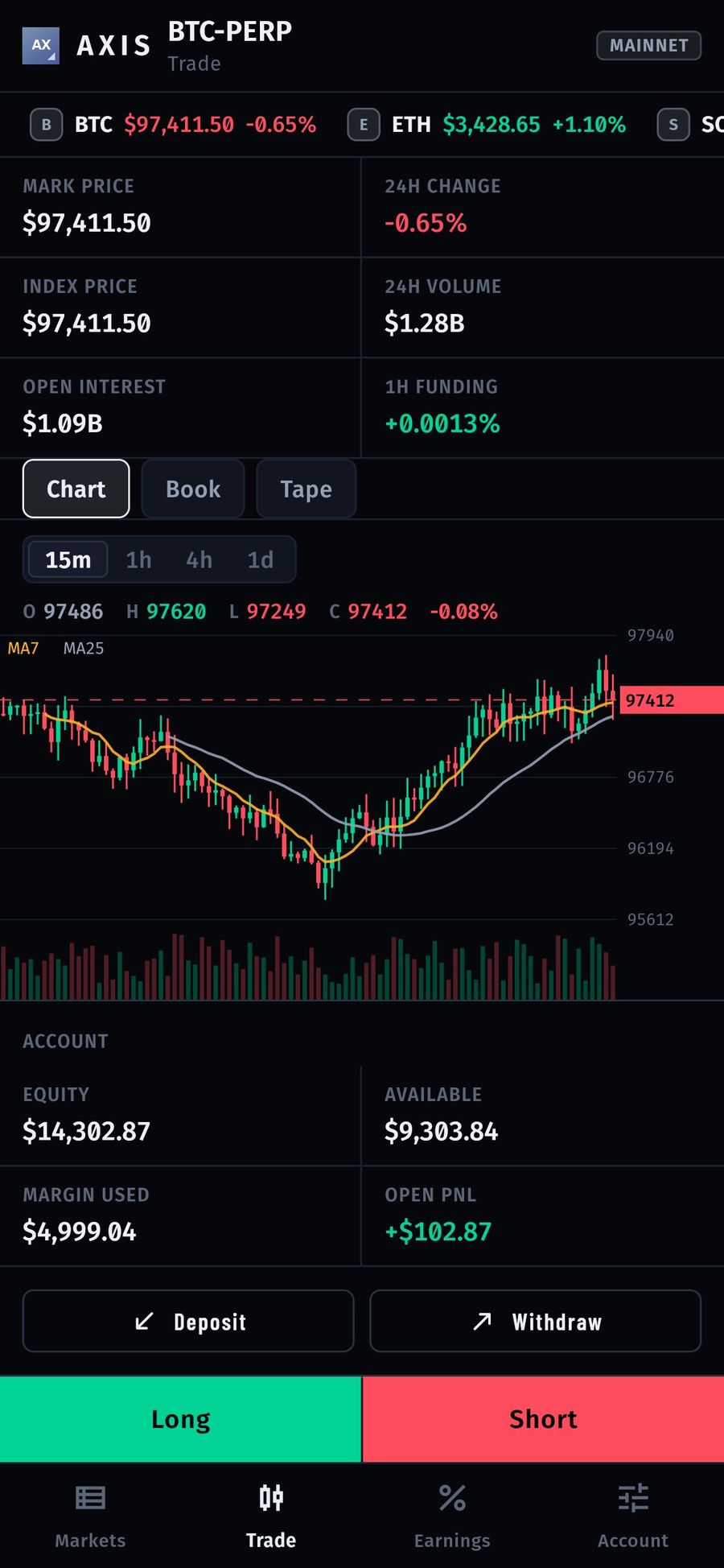
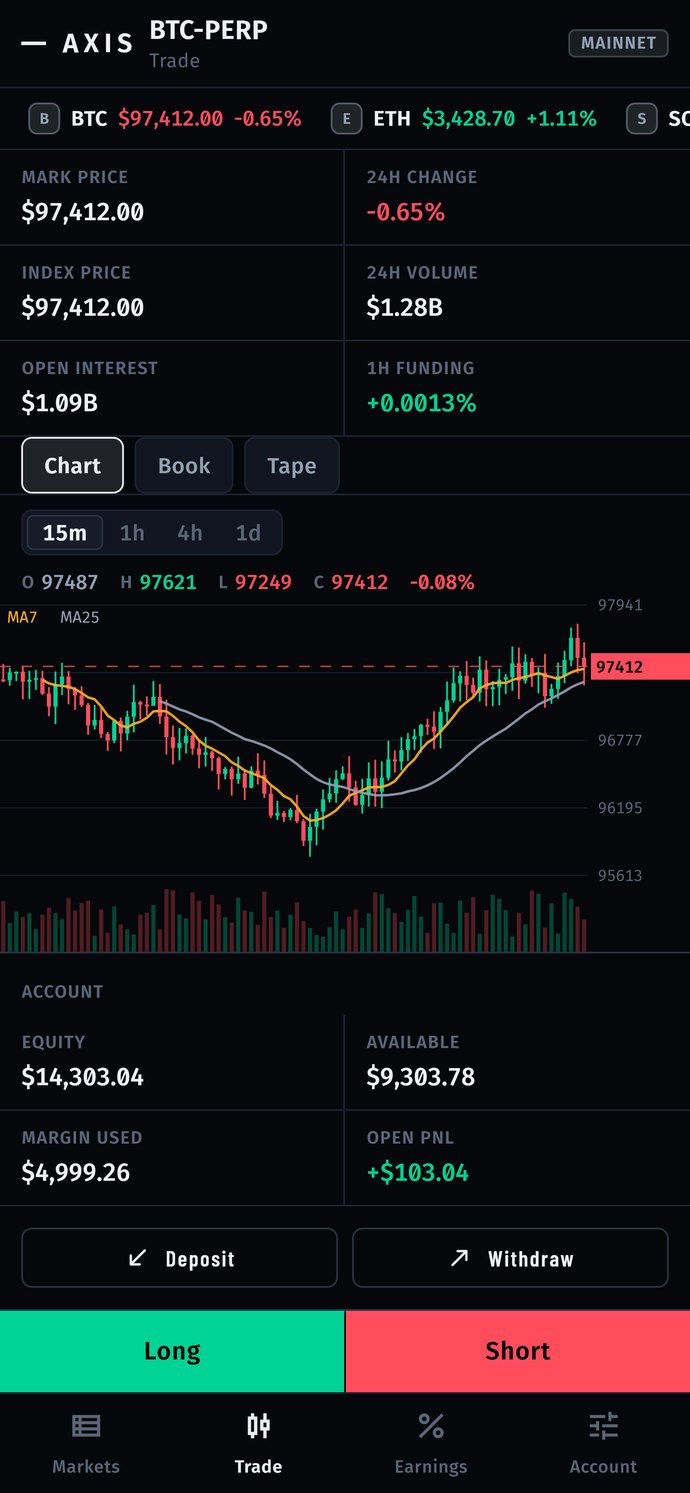
AXIS on a phone: BTC-PERP mark price, 24h change, open interest, funding, a 15m candle chart, account equity and Long / Short buttons
axis-demo.mikodes.com
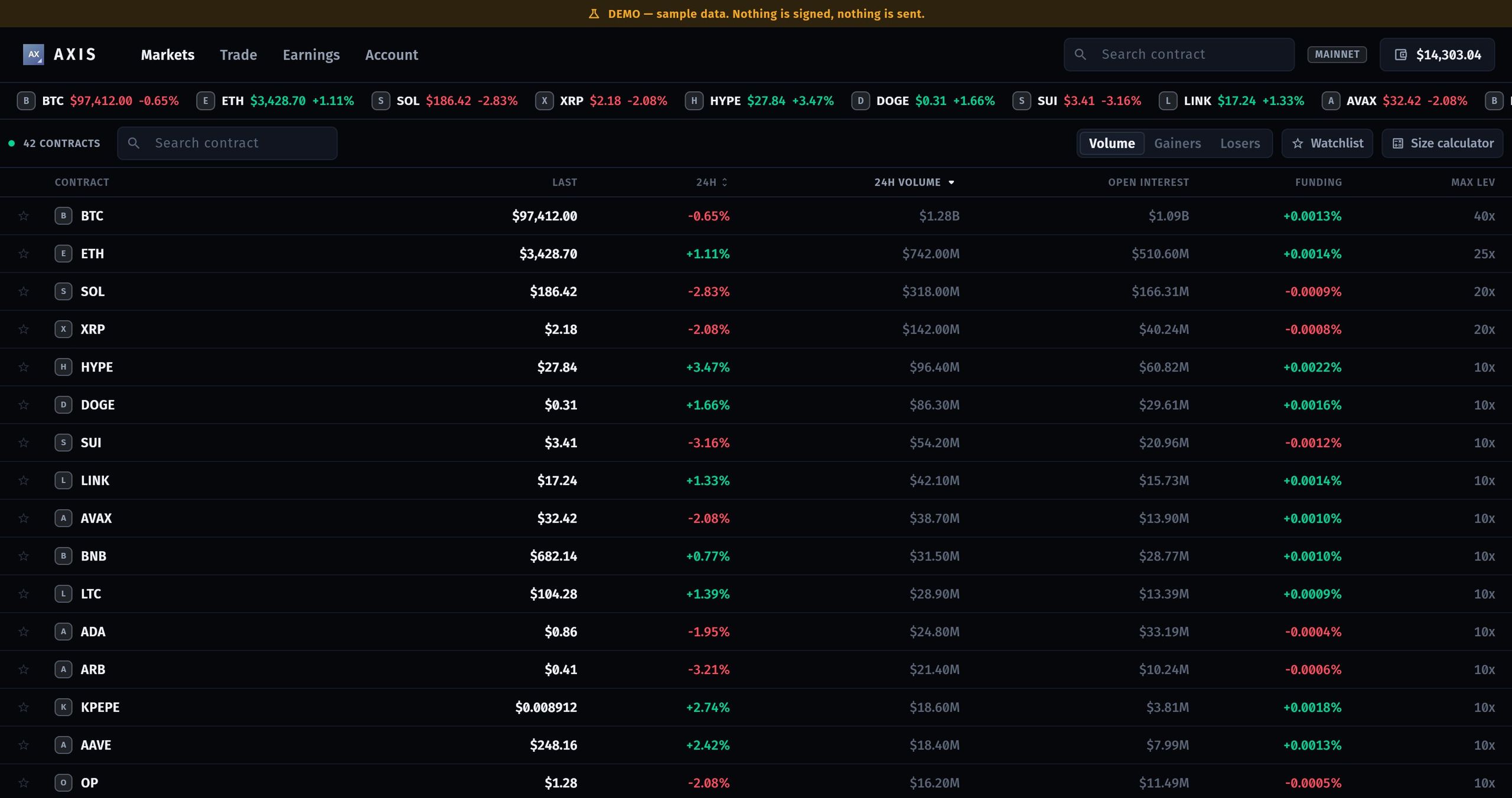
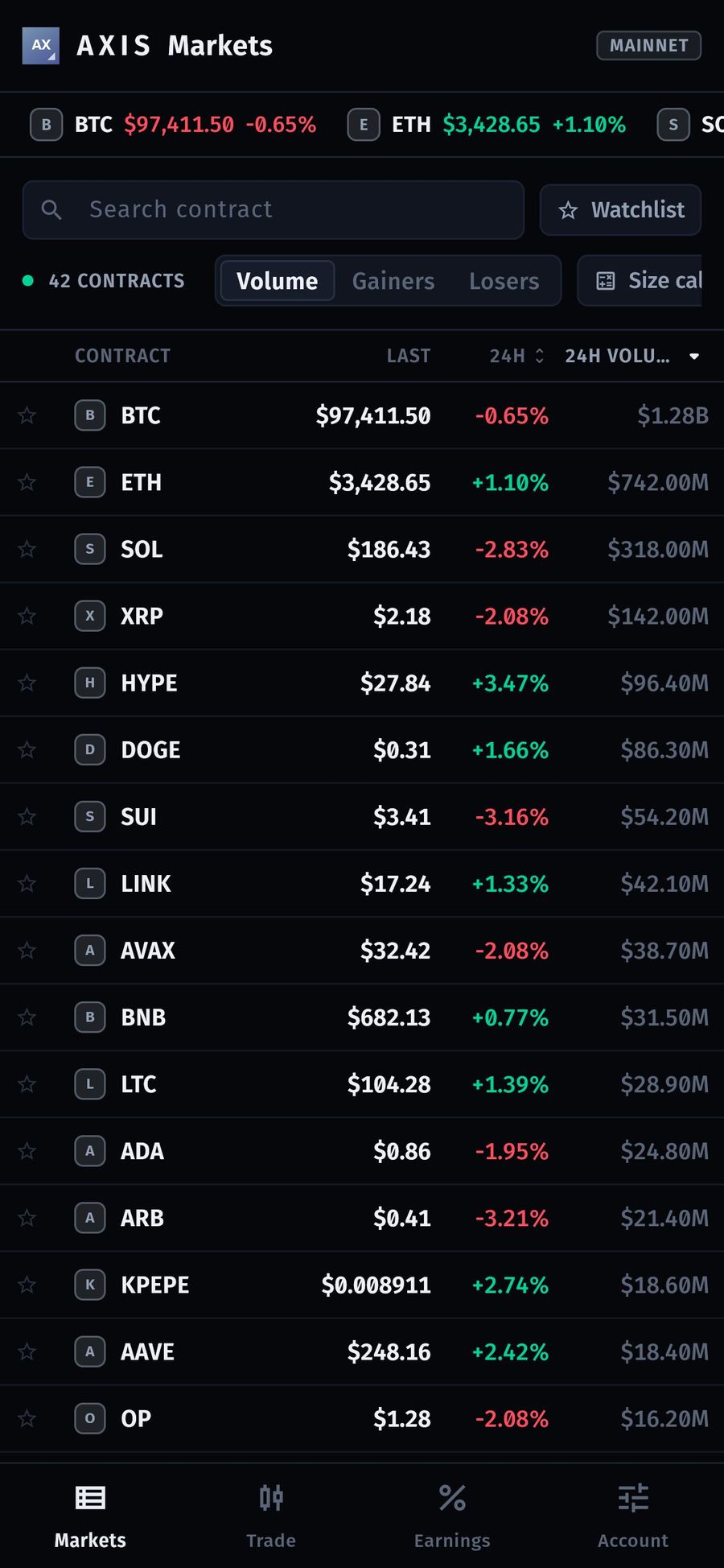
The AXIS demo build: the DEMO banner, the live ticker and the contracts board — 42 perpetual contracts with last price, 24h change, 24h volume, open interest and funding, beside the Volume / Gainers / Losers filters.
The live demo at axis-demo.mikodes.com, shot at a 1440 px browser window and shown here at its own size. The DEMO banner is the product's, not ours.

Built on

  • Flutter
  • Dart
  • Web
  • iOS
  • Android
  • Flutter
  • Dart
  • Web
  • iOS
  • Android
  • Flutter
  • Dart
  • Web
  • iOS
  • Android
  • Flutter
  • Dart
  • Web
  • iOS
  • Android
  1. Pickany Hyperliquid contract from one markets table
  2. Sizemargin, leverage, slippage — every figure before signing
  3. Signon the device; the signed order goes to Hyperliquid
  4. Feethe builder fee, paid to the address you set once a wallet approves it

Business plan

A perps terminal.
Your rate, your address.

Buy the source code once. Run it under your brand. The revenue lines are already in the code — they pay you, not us.

  1. 01Buy the sourceFlutter terminal for web, iOS and Android.
  2. 02Brand itYour name and colours; builder address and rate in the console.
  3. 03LaunchDeploy web, ship apps. Keep 100 USDC in your builder account.
  4. 04GrowEvery order from your build carries your builder code.

Who runs it

  • Trading communities and signal groups
  • Crypto influencers
  • Funds and desks wanting a branded terminal

Where the money comes from

  • Builder feesHyperliquid pays the builder address you set

Running costs Static hosting and store accounts. No servers, no keys.

Earnings calculator

What could AXIS
earn you?

Move the sliders. Caps come from the code; prices and traffic are yours to set.

Realistic example · revenue per month

—

— per year

  • Builder fees
Est. running cost—
Left for you / month—

Example scenarios, not a forecast or a promise. Your revenue depends on your users, your market and your work. Crypto trading carries risk for your users.

How the buyer earns

Your builder code.
Your rate, your address.

  • Set your builder address and rate in the operator console. Every order from your build carries your builder code.
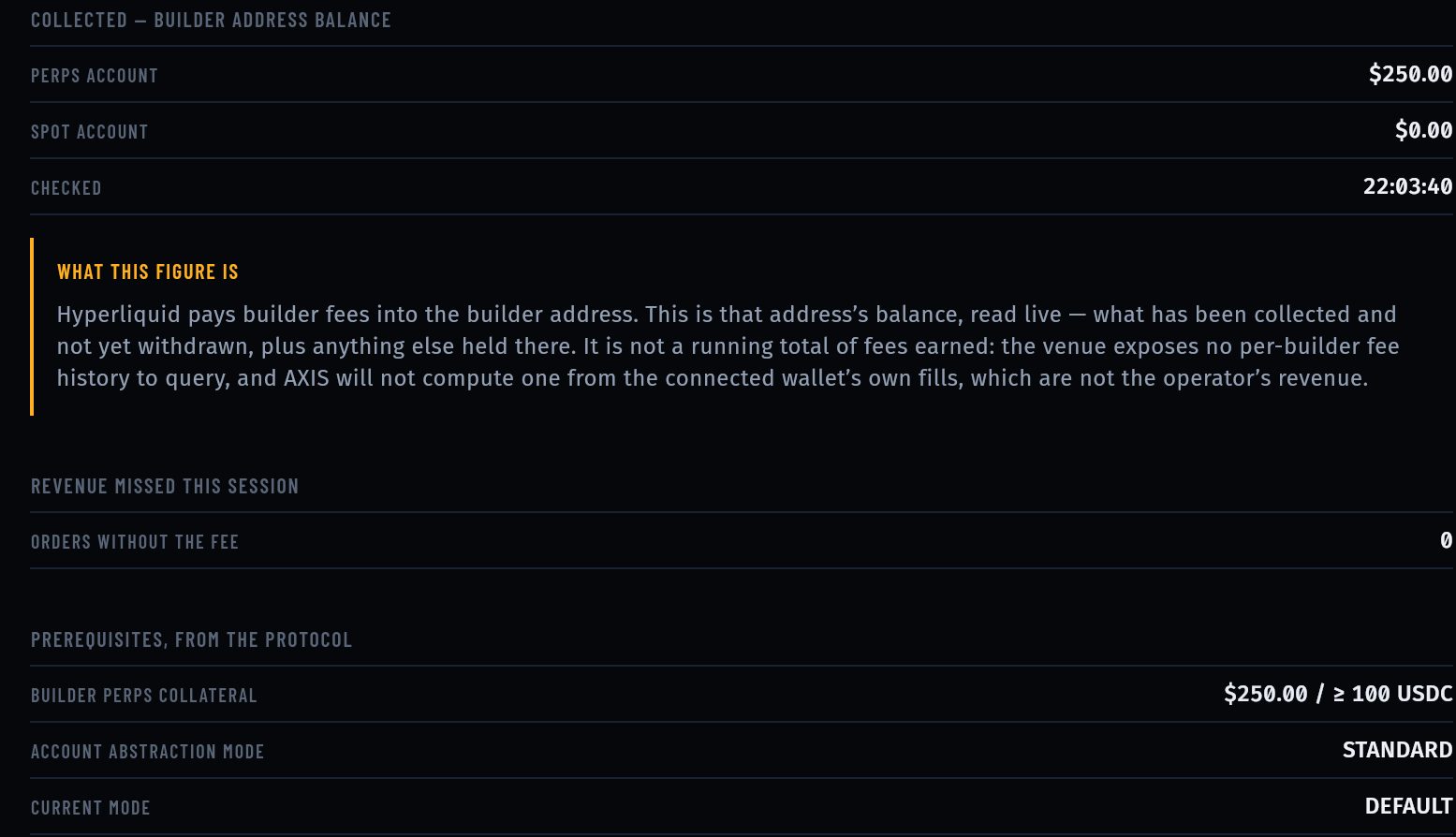
  • Hyperliquid charges the fee on the filled notional and pays it to your builder address. The protocol caps perps builder fees at 0.1%.
  • Set a separate rate for the stock dex (xyz) markets. Each user approves your fee once, on chain.
  • The protocol's prerequisites: at least 100 USDC in your builder address's perps account and the standard account mode.
0.1%protocol cap per perps fill
0default fee address shipped
3platforms: web, iOS, Android
axis-demo.mikodes.com
Earnings: builder address balance collected, what this figure is, orders without the fee, and the protocol prerequisites checked
See the Earnings screen →

What it does

The whole venue on one screen.
Your fee on every order.

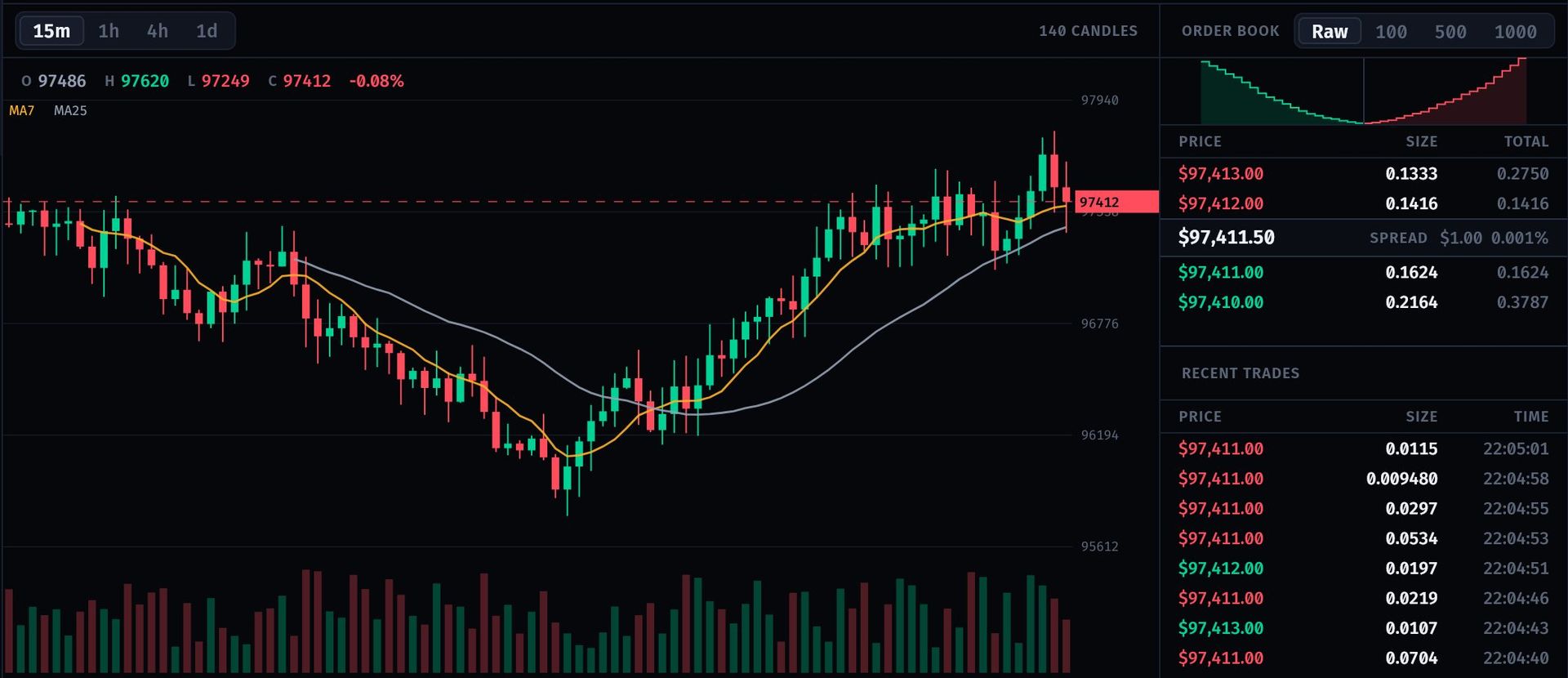
BTC-PERP 15m candle chart with MA7 and MA25, order book with spread, and recent trades

Chart, book and tape

Candles with moving averages, a grouped order book with depth, spread and the live trade tape — nothing behind a modal.

Hyperliquid REST info API + WebSocket streams

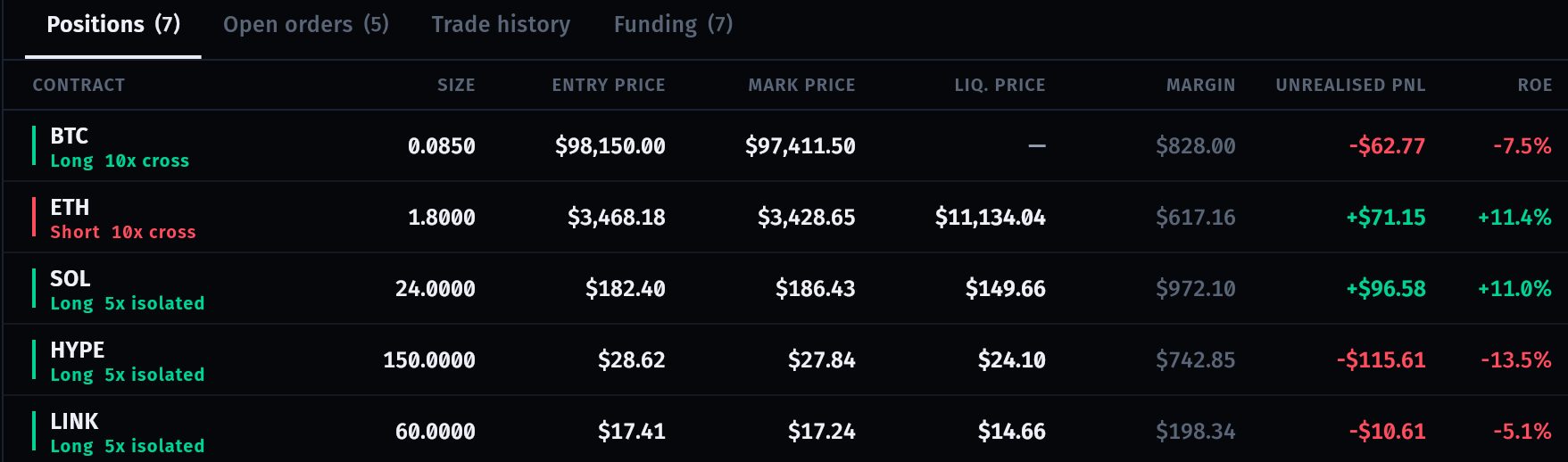
Positions table: BTC, ETH, SOL, HYPE and LINK with size, entry, mark, liquidation price, margin, PnL and ROE

Positions and blotter

Positions with entry, mark, liquidation price, margin, unrealised PnL and ROE, plus open orders, trade history and funding.

No liquidation price without a position
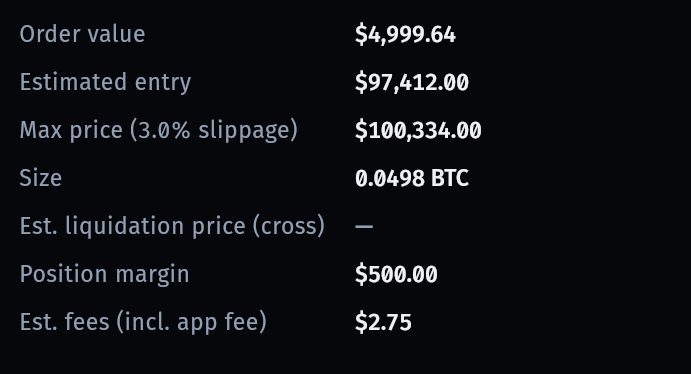
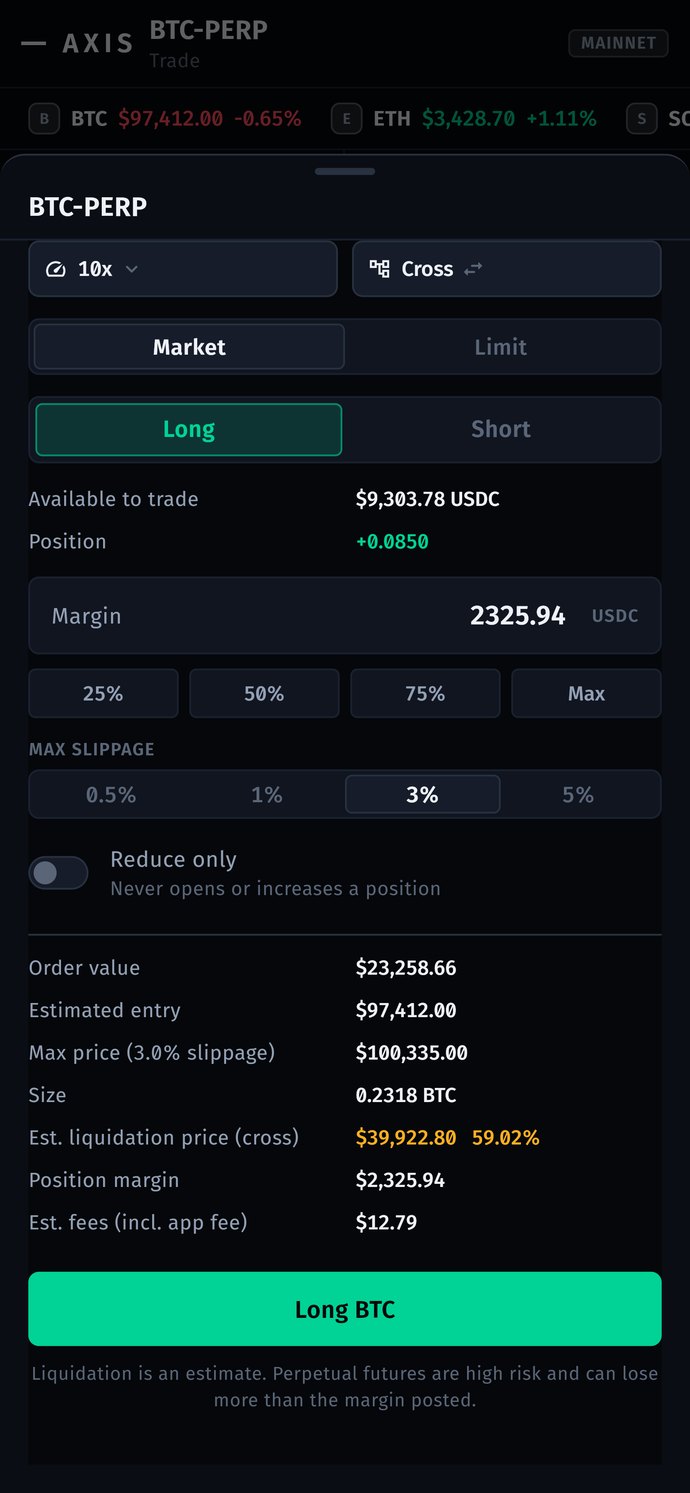
Order ticket estimate: order value, estimated entry, max price at 3% slippage, size, position margin and estimated fees

Every figure before you sign

The docked ticket shows order value, estimated entry, the slippage-capped max price, size, margin and fees including the app fee.

A risk disclosure gates the first order
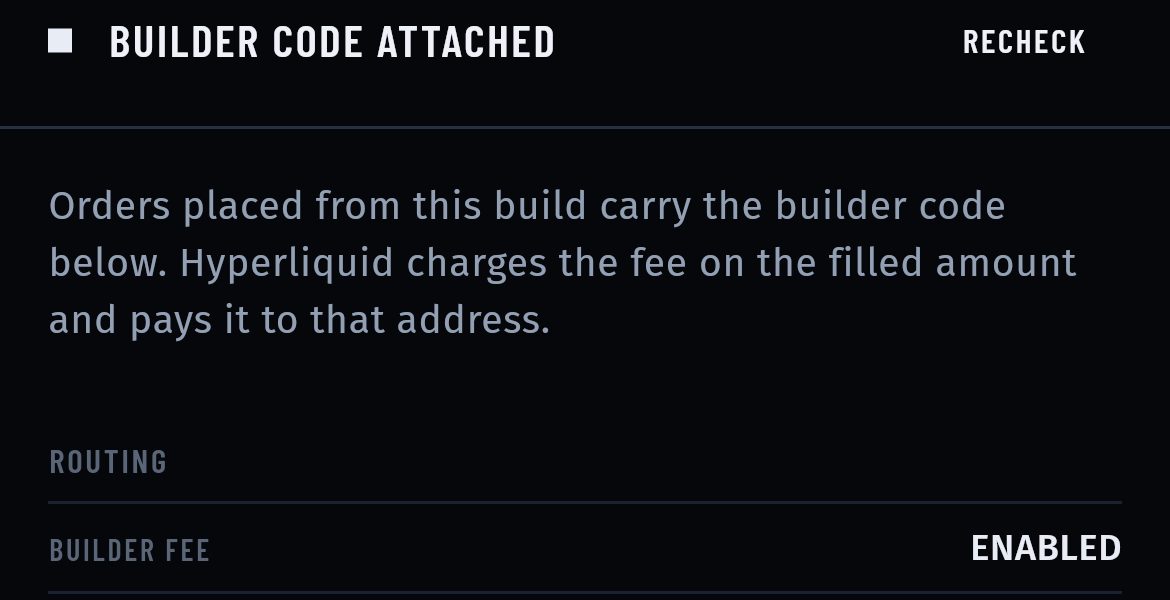
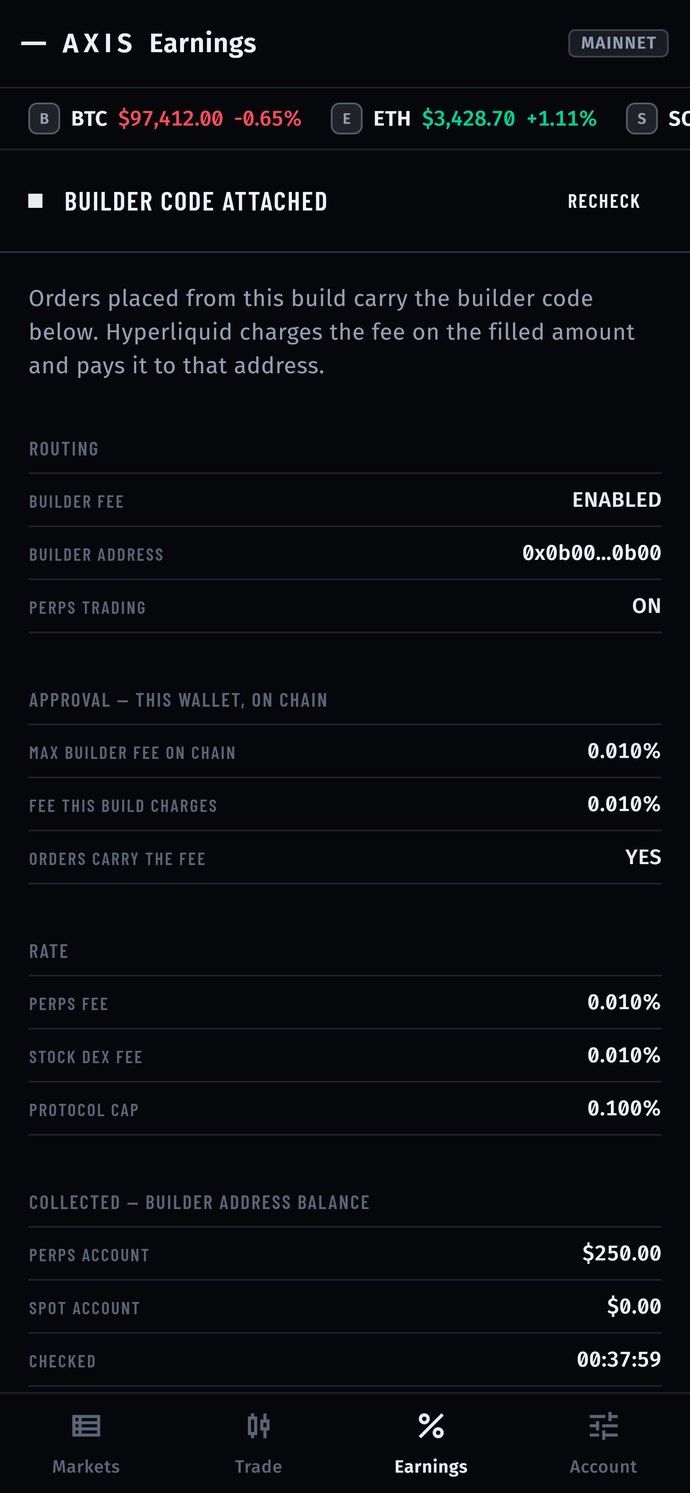
Earnings on a phone: builder code attached, orders carry the builder code, builder fee enabled, builder address and perps trading on

Builder code attached

The Earnings screen proves the routing: builder fee on, the user's on-chain approval, your rate against the protocol cap.

Ships empty: no address, no fee
PerpsHyperliquidon
Stock dexxyz marketsoff
Builder feeyour addressset

Operator switches

Turn perps and the stock / commodity dex on or off per build, without a code change. Switching off refuses new positions only.

Closing and withdrawing always stay available
Signed on deviceEIP-712
OrderBTC long 10xsigned
Servernever sees the keynone

Keys stay on the device

Create or import a 12 or 24-word wallet. Orders are signed locally with msgpack + EIP-712; USDC in and out via the Arbitrum bridge.

Signer checked against the Python SDK golden vectors

Screens from the AXIS demo build: fixture data through the real widgets, not live market data or real accounts. The switch and key cards illustrate built features.

The rest of the product

What you cannot see from the front.
The operator console, the networks, and the risk gate.

The terminal is the product. These are the screens around it: what the operator configures, what setup involves, and what a user has to read before leverage is unlocked.
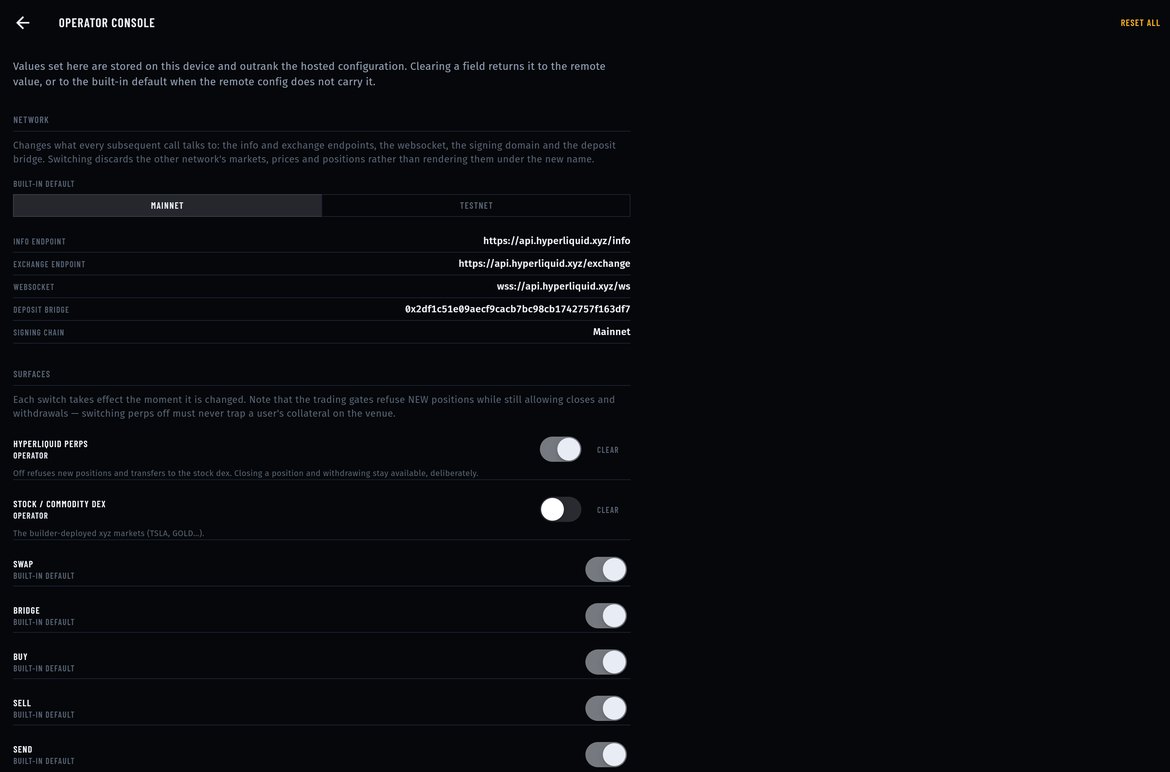
What does the operator side look like?

operator console in the AXIS build
AXIS operator console: the builder address and fee fields, RPC endpoints, and a column of switches for the features the operator can turn on or off in their own build.
What the operator configures in their own build. Values are read from the operator's config, not from a server of ours.

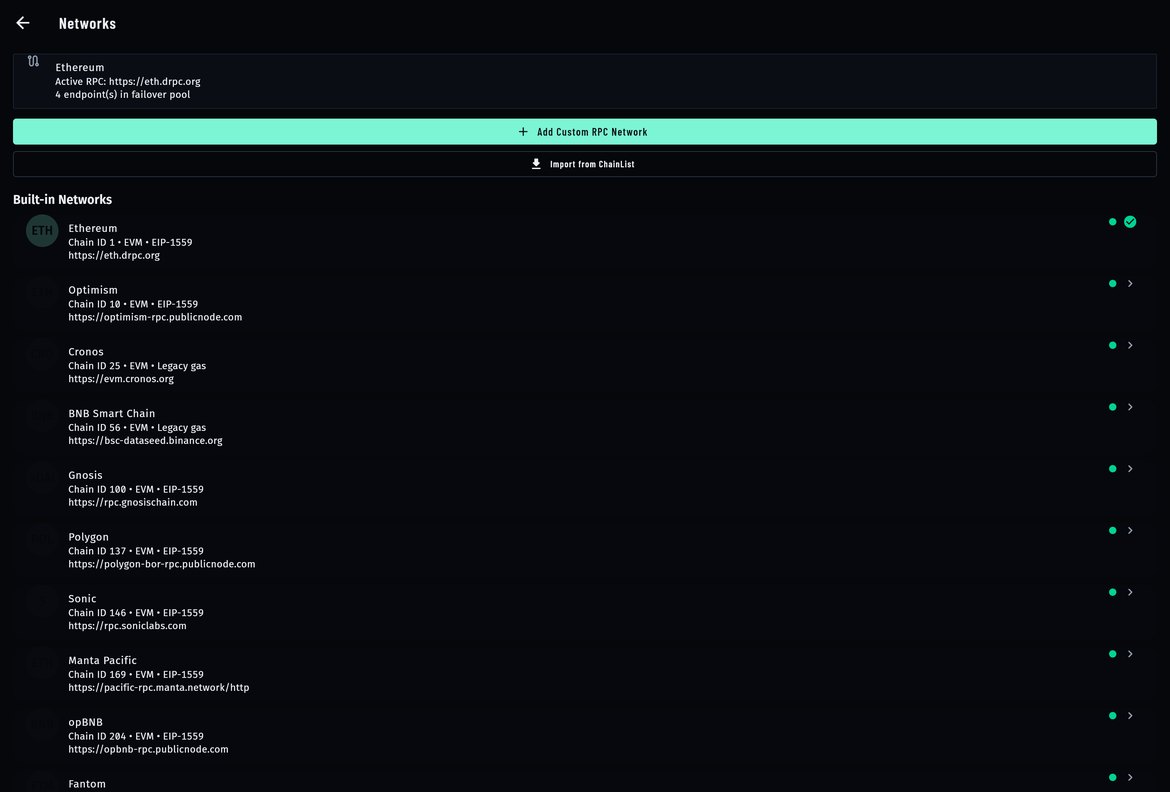
What does setting it up involve?

operator console in the AXIS build
AXIS Networks screen: the active RPC with a health note, an Add custom RPC network action, and the built-in network list with chain id and endpoint for each.
Setup is choosing networks and RPC endpoints. The buyer's build ships with the list and can add to it.

What happens when something goes wrong?

axis-demo.mikodes.com
AXIS risk gate: a dialog over the trade screen listing what leverage does to a liquidation price, that an amplifier both gains and loses, that liquidation happens automatically once the price passes its level, and that funding accrues on open positions — with a single I understand button.
The gate a user has to read before leveraged trading is unlocked in the build.

What does it look like on a phone?

9:41
AXIS trade screen on a phone: mark price, chart, equity and the Long and Short buttons
Trade
9:41
An order ticket on a phone: size, margin, estimated entry and the fees on the order
Order ticket
9:41
The earnings screen on a phone: the builder code attached to orders and the builder address
Your builder code
AXIS is a Flutter app; the phone build is the same source as the desktop one.

Interactive tour

See every screen.
Then try it live.

Real screens from the product. Click a screen to enlarge it.

9:41
AXIS on a phone: BTC-PERP mark price, 24h change, open interest, funding, a 15m candle chart, account equity and Long / Short buttons
axis-demo.mikodes.com
AXIS desktop trade screen: BTC-PERP chart, order book, recent trades, positions blotter and a Long BTC ticket with 500 USDC margin
9:41
AXIS desktop trade screen: BTC-PERP chart, order book, recent trades, positions blotter and a Long BTC ticket with 500 USDC margin
BTC-PERP 15m candle chart with MA7 and MA25, order book with spread, and recent trades
Positions table: BTC, ETH, SOL, HYPE and LINK with size, entry, mark, liquidation price, margin, PnL and ROE
Order ticket estimate: order value, estimated entry, max price at 3% slippage, size, position margin and estimated fees
Earnings on a phone: builder code attached, orders carry the builder code, builder fee enabled, builder address and perps trading on
axis-demo.mikodes.com
AXIS operator console: the builder address and fee fields, RPC endpoints, and a column of switches for the features the operator can turn on or off in their own build.
axis-demo.mikodes.com
AXIS Networks screen: the active RPC with a health note, an Add custom RPC network action, and the built-in network list with chain id and endpoint for each.
axis-demo.mikodes.com
AXIS risk gate: a dialog over the trade screen listing what leverage does to a liquidation price, that an amplifier both gains and loses, that liquidation happens automatically once the price passes its level, and that funding accrues on open positions — with a single I understand button.
9:41
AXIS trade screen on a phone: mark price, chart, equity and the Long and Short buttons
9:41
An order ticket on a phone: size, margin, estimated entry and the fees on the order
9:41
The earnings screen on a phone: the builder code attached to orders and the builder address
axis-demo.mikodes.com
Earnings: builder address balance collected, what this figure is, orders without the fee, and the protocol prerequisites checked

One screen.
The whole venue.

Chart, book, tape, positions and a docked ticket — at 1440 on the desktop, as tabs on a phone.

axis-demo.mikodes.com
AXIS desktop trade screen: BTC-PERP chart, order book, recent trades, positions blotter and a Long BTC ticket with 500 USDC margin
9:41
AXIS desktop trade screen: BTC-PERP chart, order book, recent trades, positions blotter and a Long BTC ticket with 500 USDC margin
Open the live terminal →

Their keys.
Their orders.

Non-custodialNo private key, seed or signature leaves the device. No server routes, batches or submits an order.
Operator switchPerps trading is a switch in your published config: on for a build that offers perps, off where you must not. Closing positions and withdrawing always stay available.
High risk, said plainlyLeverage can lose the whole margin. A risk disclosure gates the first order and liquidation is shown as an estimate.

AXIS is an independent interface to Hyperliquid's public API; it is not affiliated with, endorsed or sponsored by Hyperliquid. You bring your own RPC keys, an optional Firebase project (remote config, push, crash reports) and the 100 USDC your builder account must hold.

Documentation

Installed in an afternoon.
Every step written down.

19 pages written from the real code — requirements, install, configuration, deployment, troubleshooting.

Documentation

Buy source code

Own AXIS.
Ship it as yours.

  • Full source code, yours to rebrand and run
  • Documentation — 19 pages, also online
  • A live demo to click through before you pay
  • Item support through CodeCanyon

Installation & customization

Want it installed on your servers, rebranded or extended? The team that built it does that — write to us.

AXIS · source code

Coming to CodeCanyon

The source code will be sold on CodeCanyon (Envato Market).

Click through it yourself.

Live demo in demo mode (sample data, nothing signed or sent) · source code version 1.0.0 · coming to CodeCanyon

Installation & custom work

The download is not the end of it.
Tell us what you need.

The code is sold on CodeCanyon. The work around it — getting it live, changing it, or building you something of your own — is ours, and it starts as a conversation on Telegram, not a form.

Install it for me

You bought the code and you want it running, not a folder of files.

  • On your own servers, your domain, your keys
  • Your name and colours, not ours
  • Handed over working, with what we changed written down

Add features

AXIS plus the one thing it does not do yet.

  • A screen, a chain, a payment method, a report
  • Built into your copy, so updates still apply
  • We say up front if it is a bad idea

Build something custom

A product of your own, on foundations that already work.

  • Starts from what is proven here, not a blank page
  • Yours alone — we do not resell it
  • Same standard as the products on this page

MIKODES is a Slovak company and has been selling on CodeCanyon since April 2019. 19 products run in the open at mikodes.com — Solana, Hyperliquid, Base, Telegram and WordPress. Tell us what you need and we will tell you what it takes; we will also say when we are the wrong people for it.

Talk to us

Start the conversation.

Telegram is fastest and it reaches the person who built this, in English. Describe what you need and you get an honest answer about what it takes. The source code itself is sold on CodeCanyon.

Telegram · fastest

Talk on Telegram

E-mail

For installation and customization quotes.

Other MIKODES products

Also by MIKODES.

Live demoBuy source code