Troubleshooting
symptom, cause, fix.
Start with the diagnostics below: where AXIS writes its log lines, and the commands that tell you whether Hyperliquid, your config file or Firebase are reachable. Then find your symptom. Search with / for the exact error text.
01Diagnose first: where to look
AXIS logs through one class, Logger (lib/utils/logger.dart). Lines start with INFO:, WARN: or ERROR:. They are printed in debug builds only; a release build stays silent, except for FATAL: lines when the app could not start. Long key-like strings (private keys, seed phrases) are replaced with [REDACTED] before printing.
| Where you run it | How to see the log |
|---|---|
| Web, on your computer | flutter run -d chrome. Log lines appear in the terminal you started it from and in Chrome's DevTools Console (press F12, or Cmd+Option+I on a Mac). |
| Android or iOS device / emulator | flutter run with the device connected, or flutter logs in a second terminal while the app runs. |
| A deployed web build | No WARN/INFO output (release mode). Use DevTools Network (below) to see which request fails. |
flutter run -d chrome                      # debug build, logs in this terminal
flutter run -d chrome --dart-define=HYPERLIQUID_NETWORK=testnet
flutter logs                               # logs from a connected phone or emulator
The status bar
On wide screens the bottom bar of the terminal is a live health readout (lib/screens/axis_chrome.dart):
| Shows | Means |
|---|---|
Mainnet / Testnet (amber) | The network every request goes to. The header badge says the same. |
Offline (red) | The device has no connection. |
Book 473ms, amber when older than 10 s | Age of the newest order-book snapshot from the WebSocket. Growing numbers mean the live feed stalled. |
Account 6.2s / Account error / No signing key | Age of the last account read, a failed account read, or no wallet on this device. |
No contracts | The market list did not load from the info endpoint. |
DevTools Network tab (web)
Open DevTools → Network, reload, and filter by hyperliquid, config or arbitrum. A red row shows the failing request; its Status column and the Console say why (CORS, 4xx, 5xx, blocked by an extension). The WebSocket appears under the WS filter as wss://api.hyperliquid.xyz/ws; its Messages tab should show frames arriving.
02Hyperliquid API and WebSocket
Endpoints are fixed per network in lib/core/hyperliquid/hyperliquid_env.dart: mainnet https://api.hyperliquid.xyz (/info, /exchange, wss://api.hyperliquid.xyz/ws), testnet https://api.hyperliquid-testnet.xyz. Operator console → Network lists the ones your build is using.
Check that the info endpoint answers from your machine. A healthy answer is HTTP 200 and JSON starting with {"universe":[:
curl -s -o /dev/null -w "%{http_code}\n" -X POST https://api.hyperliquid.xyz/info \
  -H 'Content-Type: application/json' -d '{"type":"meta"}'
# testnet
curl -s -o /dev/null -w "%{http_code}\n" -X POST https://api.hyperliquid-testnet.xyz/info \
  -H 'Content-Type: application/json' -d '{"type":"meta"}'
Both returned 200 when these docs were written.
Markets stay empty, status bar says No contracts
The market list failed to load. Look for WARN: HL loadMarkets failed: … in the log. If curl above fails too, the problem is your network, a firewall or a proxy, not the app. If curl works but the browser does not, an ad blocker or privacy extension is blocking api.hyperliquid.xyz: try a private window without extensions.
Prices freeze, Book age keeps growing
The WebSocket stalled. AXIS pings every 30 s and reconnects by itself if nothing arrives for 75 s (lib/core/hyperliquid/hyperliquid_ws.dart), logging WARN: HyperliquidWs stale for >75s — reconnecting or WARN: HyperliquidWs error: …. If it never recovers, check that the network allows WebSocket connections to wss://api.hyperliquid.xyz/ws (corporate proxies often block them), then reload. WARN: HyperliquidWs server error: … is a message from Hyperliquid itself.
Intermittent failures, HTTP 429
Hyperliquid rate-limits requests per IP address and per account; the current limits are in Hyperliquid's API documentation. A 429 shows in the log as HyperliquidApiException(info: 429 …) or, for orders, WARN: HL order rejected by the exchange: … and the ticket says Hyperliquid rejected the request (429). The order was not placed. Wait and retry. Many terminals open on one office network share one IP's budget.
Prices look wrong, volumes are tiny
The build is on testnet. The header badge and the status bar show Testnet in amber. A build started with --dart-define=HYPERLIQUID_NETWORK=testnet, or a device switched in Operator console → Network, stays there until changed back. Unrecognised values of the define fall back to mainnet.
03Order and signature rejections
Every order is signed on the device (lib/core/hyperliquid/hyperliquid_signer.dart): exchange actions with Hyperliquid's EIP-712 "phantom agent" scheme (chain id 1337, source a on mainnet, b on testnet), approvals and withdrawals as user-signed EIP-712 messages that carry hyperliquidChain = Mainnet or Testnet. Both are derived from the same network setting as the endpoints, so a build cannot sign for one network and send to the other.
| What the trader sees | Log line | Meaning and fix |
|---|---|---|
| Trading is currently unavailable. You can still close positions. | none | Perps are off: hyperliquid_perps_enabled ships false. Publish true, or switch it on for one device in Operator console → Surfaces. |
| This order could not be built: … | HL order rejected locally before sending | Never left the device: a size or price with too many decimals, or a malformed key. |
| Minimum order value is $10 (margin × leverage). | none | Increase margin or leverage. |
| Hyperliquid rejected the request (4xx). The order was not placed. | HL order rejected by the exchange: HyperliquidApiException(exchange: …) | The exchange answered with an HTTP error. The body after the status code is Hyperliquid's own reason. |
| Hyperliquid's error text in the ticket | HL action error: … | The exchange accepted the request but refused the action (margin, price band, account state). The text is Hyperliquid's; search their docs for it. A rejection for an address with no deposit on that network usually means the wallet has not been funded on the network the build uses. |
| A notice that the outcome is unknown | HL order response lost (…) — checking cloid | The request may have reached the exchange (timeout, dropped connection, 5xx). AXIS looks the order up by its client order id before letting the trader retry, to avoid a double position. |
Rejections that mention the nonce or the time
The nonce is the device's clock in milliseconds, made strictly increasing per signer (nextNonce() in lib/core/hyperliquid/hyperliquid_exchange_api.dart). Hyperliquid only accepts nonces close to its own time (the code notes a window of two days back and one day ahead). A device whose clock is far off gets its actions refused: turn on automatic date and time, then retry.
A signature error right after switching network
Fully close and reopen the app after switching in the operator console, so every provider picks up the new network, then retry. If it persists, note the exact error text and the network badge and contact support.
04Builder fee not arriving
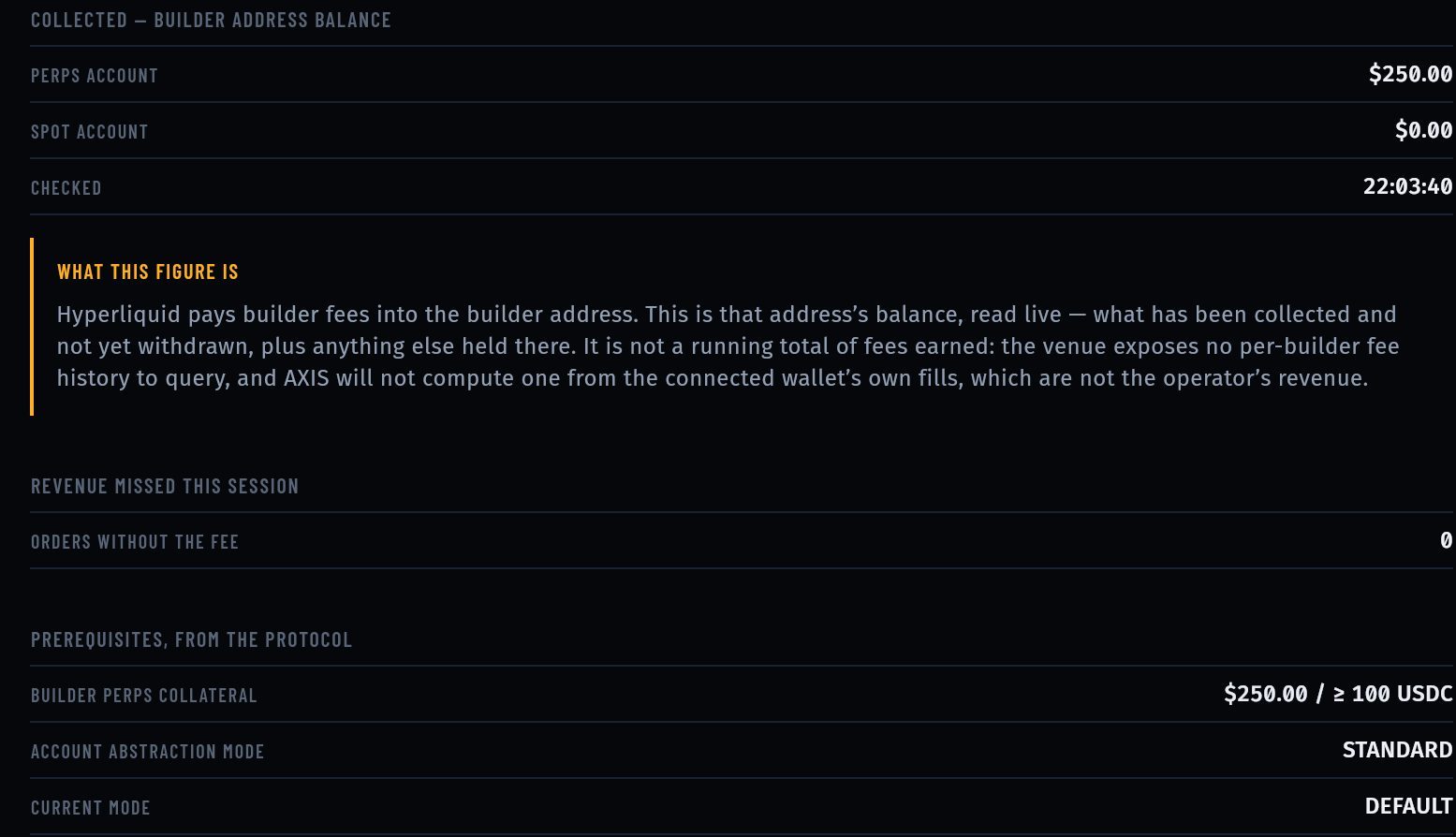
Open Earnings and press RECHECK: it is the read-only status of routing, the on-chain approval, the rate and the builder balance (every line explained). Then work down this list.
- Is a builder code configured at all?Earnings title
NO BUILDER CODEmeans the fee is off, the address is empty or malformed, or the rate is 0 or above 100. The log saysWARN: HL builder fee config ignored (invalid address or fee N tenths-bps; allowed 1..100). - Did this wallet approve the rate?MAX BUILDER FEE ON CHAIN must be at least FEE THIS BUILD CHARGES. Otherwise the log shows
WARN: HL builder dropped: approval A < fee F tenths-bps — order placed without the app fee, and the trader is asked to approve at the next order. If the approval request itself failed, the trader saw Fee approval failed (…). Placing the order without the app fee. and the log hasHL approveBuilderFee rejectedorHL approveBuilderFee failed. Check the approval from a terminal with themaxBuilderFeequery in Accounts you must arrange. - Did the approval lookup fail?
UNKNOWNon Earnings andWARN: HL maxBuilderFee failed, trading without builder: …in the log. Usually a temporary API or rate-limit problem; the order went out without the code. - 100 USDC of perps collateral?Hyperliquid does not pay a builder address holding less. Prerequisites → BUILDER PERPS COLLATERAL shows the live value against
≥ 100 USDC. Spot balance and USDC on Arbitrum do not count. - Account modePrerequisites → CURRENT MODE shows what the venue reports for the builder address. The requirement shown is standard mode.
WARN: HL userAbstraction(…) failedmeans the check could not be read. - Rate above the cap?Perps builder fees above 0.1 % (100 in AXIS units) are rejected by the venue. AXIS refuses such values before sending, so the order goes out without a code rather than failing.
- Set only on your device?Values typed in the operator console reach only that device. Your users need the values in your published config (why).
05Bridge deposits and withdrawals
A deposit is a plain USDC transfer on Arbitrum One (chain id 42161) to Hyperliquid's Bridge2 contract, which credits the sender's Hyperliquid account. The addresses and the minimum are in lib/core/hyperliquid/hyperliquid_env.dart and shown under Operator console → Network → DEPOSIT BRIDGE.
- Native USDC only. The token at
0xaf88d065e77c8cC2239327C5EDb3A432268e5831on Arbitrum. Bridged USDC.e is not credited. - Minimum 5 USDC (
minDepositUsdc). Smaller amounts are not credited by the bridge, and the app refuses them with Minimum deposit is 5 USDC. - ETH on Arbitrum for gas. The transfer is an Arbitrum transaction paid by the sender. Without ETH the transfer fails with Deposit transfer failed: ….
- Mainnet builds only. The deposit always moves real USDC on Arbitrum One, so a build on testnet refuses it with Perps deposits are only available on a mainnet build (HYPERLIQUID_NETWORK=mainnet). Refusing to send real USDC to a non-mainnet bridge address. (
lib/features/perps/perps_wallet_config.dart). On testnet, fund the account from Hyperliquid's testnet faucet instead.
Could not read your balance before depositing, so the deposit was not sent.
The app reads the account balance first, to tell when the deposit lands. That read failed (API or rate limit). Nothing left the wallet; try again.
Deposit sent but not yet credited.
The transfer was broadcast and the app stopped waiting before the balance rose. Crediting usually takes about a minute and can take a few. Look up the transaction hash on arbiscan.io: if it succeeded and went to the bridge address, the credit follows. If it failed, check gas and the token.
A withdrawal is smaller than requested
The withdraw sheet shows a flat 1 USDC Hyperliquid withdrawal fee. Withdrawals arrive at the same address on Arbitrum after a few minutes.
06RPC failures (Arbitrum)
Hyperliquid itself needs no RPC. Arbitrum does: the wallet's balances on Arbitrum and the deposit transfer use the Arbitrum RPC endpoints in lib/core/chains.dart (a public primary endpoint and two public fallbacks).
- Test the endpointA healthy answer is
{"jsonrpc":"2.0","id":1,"result":"0xa4b1"}(42161 in hex).curl -s -X POST https://arb1.arbitrum.io/rpc -H 'Content-Type: application/json' \ -d '{"jsonrpc":"2.0","id":1,"method":"eth_chainId","params":[]}' - Look in the Network tabFilter by the RPC host. 429 or 403 means the public endpoint is rate-limiting you.
- Use your own providerAdd a provider endpoint under Account → Networks on a device, or change the defaults in
lib/core/chains.dartand rebuild for everyone (why a paid provider for production).
07Remote config.json not loading
The URL is the constant kAxisAdminConfigUrl in lib/core/config/axis_identity.dart (read through kAdminConfigUrl in lib/core/config/app_config.dart). It ships empty, which disables the hosted channel.
- Is the URL compiled in?Set it, then rebuild. A hot reload or an edit of the hosted file does not change the address.
- Does it answer?Expect
200and a JSON object:curl -s -i https://<your-domain>/config.json | head -20 - CORS (web only)If the file is on a different origin from the terminal, the response must carry an
Access-Control-Allow-Originheader that allows your terminal's origin. Check for it:
A missing header shows in the browser Console as a CORS error, and in the log ascurl -s -I -H 'Origin: https://<your-terminal-domain>' https://<your-domain>/config.jsonWARN: [HttpAdminConfig] fetch failed – …. - Read the log
INFO: [HttpAdminConfig] fetched fresh config from … (maintenance=…, feeBps=…)means it worked.WARN: [HttpAdminConfig] HTTP 404 from …names the status. A fetch slower than 8 seconds times out. - Overridden on this device?In Operator console, a value tagged
OPERATORoutranks the file. Press CLEAR next to it. - Cold startThe app shows its cached copy at start and fetches in the background, so changes appear on the next cold start.
Values keep changing back
With Firebase configured, the Firestore document app_config/runtime_admin_config is watched live and replaces the settings when it changes. Keep one channel, or keep both identical. Watch failures log WARN: [FirestoreAdminConfig] watch failed – ….
A device is stuck on the maintenance screen
maintenance_mode is on. Publish false. If it was set in the console on that device, the override stays until the app's data is cleared (web: clear the site data; mobile: reinstall), because the console is not reachable from the maintenance screen. Clearing app data also deletes the wallet on that device: make sure its recovery phrase is backed up first.
08Firebase
FirebaseService: dev placeholder credentials detected – skipping initialization.
Expected while lib/firebase_options.dart is the shipped placeholder. The app runs without Firebase. To connect your project run flutterfire configure --project=<your-project> (steps), then rebuild.
FirebaseService: initialization failed – running without Firebase.
The options exist but Firebase refused them: the app ID does not match the one registered in the Firebase project (re-run flutterfire configure after any app ID change), or the platform file is missing (android/app/google-services.json, ios/Runner/GoogleService-Info.plist). The error text follows in the same line.
Success looks like
INFO: FirebaseService: initialized successfully in a debug run.
Android build says "AXIS: no google-services.json — building without Firebase."
A notice, not an error. The Android build applies the Google Services and Crashlytics plugins only when that file exists.
09WalletConnect
The screen says WalletConnect not configured
No Reown project ID. Publish walletconnect_project_id, or build with --dart-define=REOWN_PROJECT_ID=<id>. Without an ID the service does not start at all (lib/features/wallet_connect/reown_wallet_service.dart).
The screen says WalletConnect is currently disabled.
walletconnect_enabled is false in your config or in the console on that device.
Pairing fails on the web build only
If your Reown project restricts allowed domains, your terminal's origin must be on that list (Reown). Check the Console for errors from the Reown relay.
10Build and run
Error: app_localizations.dart not found / AppLocalizations undefined
The translations are generated, not stored. Run flutter gen-l10n, then build again. Repeat it after every flutter clean.
flutter pub get fails on the SDK version
Update Flutter to a current stable release (flutter upgrade). See Requirements for the versions.
Google Play rejects the upload as debug-signed
android/key.properties is missing or incomplete, so the release build used the debug key. Set all four signing values (how).
iOS: CocoaPods or signing errors
Run cd ios && pod install, open ios/Runner.xcworkspace (not the .xcodeproj) and pick your team under Signing & Capabilities.
Web Console: CORS or 403 errors from Solana, Sui, Moonbeam, drpc or CoinGecko hosts
After a wallet is created or imported, the wallet engine AXIS is built on runs its RPC health and price checks across all the networks it knows, and some public endpoints refuse browser requests (CORS) or rate-limit them (403). These lines are not Content-Security-Policy violations and do not affect trading on Hyperliquid, which uses only the Hyperliquid API and Arbitrum. You can ignore them.
Blank page on a deployed web build
Open the Console. A line starting FATAL: AXIS failed to start: is printed even in release builds when start-up failed, with the reason. Also check that every file of build/web/ was uploaded.
11Still stuck?
See Support. Include the version, the platform, the output of flutter --version, the exact command, the full error text and the relevant WARN: lines from a debug run. Remove addresses you do not want to share, and never send a recovery phrase or private key.